How to install the Cisco VPN client on Windows 10.
If you're here you probably know that Cisco's VPN client is not supported on
Windows 10 and that Cisco has ceased supporting their VPN client at all. The
below steps will show you how to get it working on Windows 10.
Step 1: Download Dell Sonic Wall
32 bit
http://help.mysonicwall.com/applications/vpnclient/GVCSetup32_4.9.0.1202_EN.exe
64 bit
Step 2: install Cisco vpn
Cisco Systems VPN Client 5.0.07.0290
https://drive.google.com/file/d/0Bw6xF1R9rrTLZDZScW1jNmhzM1U/view?pref=2&pli=1
To fix: the below error.

Click Start and type regedit in the Search field and
hit enter.
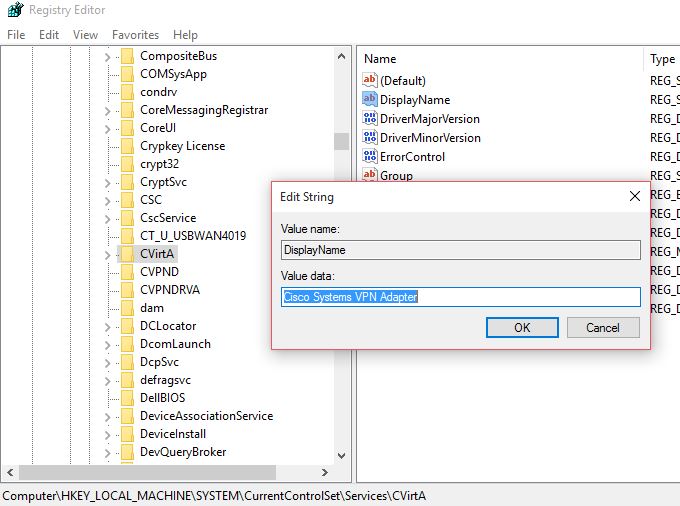
Navigate to
HKEY_LOCAL_MACHINE\SYSTEM\CurrentControlSet\Services\CVirtA
Find the String Value called Display Name
Right click and select Modify from the context menu.
For Windows 8/10 32bit (x86) operating systems, change the value data from @oem8. inf , %CVirtA_Desc%;Cisco Systems VPN Adapter to Cisco Systems VPN Adapter

For Windows 8/10 64bit (x64) operating systems, change the value data from @oem8. inf , %CVirtA_Desc%;Cisco Systems VPN Adapter for 64-bit Windows to Cisco
Systems VPN Adapter for 64-bit Windows Click Ok.
For Windows 8/10 32bit (x86) operating systems, change the value data from @oem8
For Windows 8/10 64bit (x64) operating systems, change the value data from @oem8
Systems VPN Adapter for 64-bit Windows Click Ok.

Close Registry Editor.
Retry your Cisco VPN Client connection.

